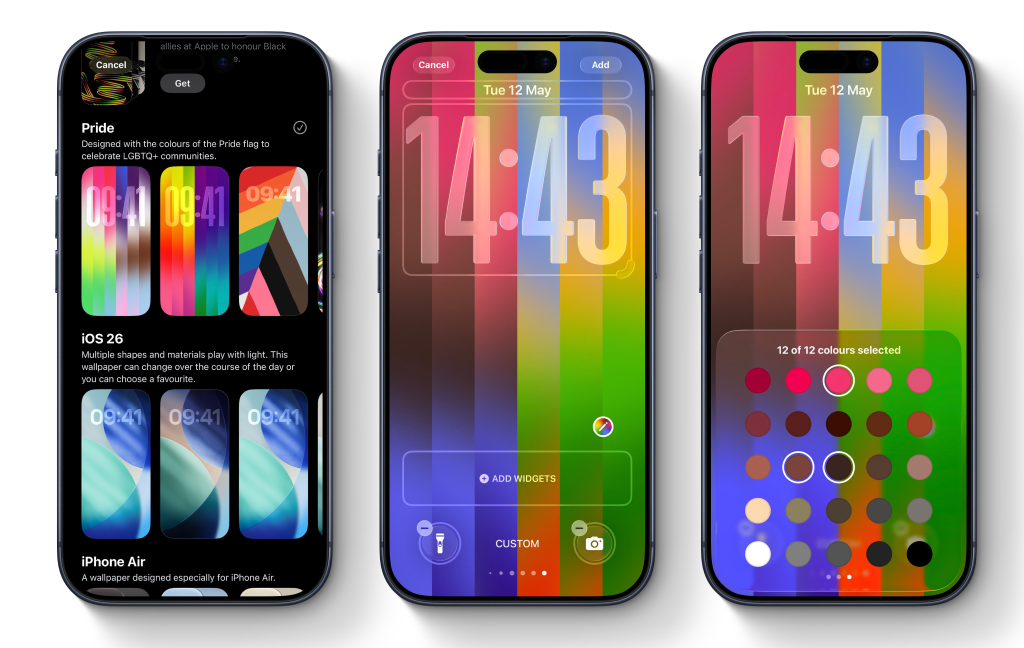
With the iOS 26.5 update, Apple has added a new Pride Luminance wallpaper to your iPhone. The wallpaper features strips of colors that transition as you swipe up from the lock screen to the home screen. By default, the wallpaper uses a rich, vibrant color palette that celebrates the LGBTQ+ community. But it’s actually super customizable, and it allows you to pick your own personal color palette for your iPhone’s lock screen. Here’s how to add the new colorful wallpaper and make it your own. To install the Pride Luminance wallpaper, you first need to update to iOS 26.5. The free software update was released for all compatible iPhone models earlier this week. If you haven’t updated yet, go to Settings -> Software Update. After installing the new operating system version, you’ll need to get the new Pride wallpaper. Long-press on your lock screen to open the Wallpapers gallery. In the Wallpapers gallery, tap the plus button to add a new wallpaper and scroll down to the Pride section.…